How I handled multiple checkboxes with react.js
I am a software engineer, with BSc. Industrial Mathematics with Computer Science at the University of Lagos, Akoka.
I am very adaptable and learning-driven. When there is a problem, I seek ways to fix it. whether it's reading a book of picking up a tutorial on a framework I don't know, I've grown to embrace the challenges that come with development
While learning react.js and practising a tiny task my instructor gave, I was faced with a challenge:
Handling multiple checkboxes
How do I let the user select more than one option using checkboxes

Here's how I solved it:
To follow along you'll need to create a new react app
npx create-react-app handle-multi-checkbox
cd handle-multi-checkbox
npm start
Once the setup is complete you'll need to remove all generated code in App.js and replace it with this:
import React from "react";
import "./App.css";

class App extends React.Component {
    constructor() {
        super();
        this.state = {
            colors: {
                red: true,
                green: false,
                blue: true,
                yellow: false,
                cyan: false,
            },
        };
    }
    render() {
        return (
            <div className="App">
                <header className="header">
                    <h1>Handling Multiple Checkboxes</h1>
                </header>

                <main>
                    <div>
                        <label>Choose your favourite colors</label>
                        <div>
                            <input type="checkbox" /> Red
                        </div>
                        <div>
                            <input type="checkbox" /> Blue
                        </div>
                        <div>
                            <input type="checkbox" /> Green
                        </div>
                        <div>
                            <input type="checkbox" /> Yellow
                        </div>
                        <div>
                            <input type="checkbox" /> Cyan
                        </div>
                    </div>
                </main>
            </div>
        );
    }
}
Next, we would set our checkboxes to checked or not checked depending on our state:
class App extends React.Component {
    constructor() {
        super();
        this.state = {
            colors: {
                red: true,
                green: false,
                blue: true,
                yellow: false,
                cyan: false,
            },
        };
    }
    render() {
        return (
            <div className="App">
                <header className="header">
                    <h1>Handling Multiple Checkboxes</h1>
                </header>

                <main>
                    <div>
                        <label>Choose your favourite colors</label>
                        <div>
                            <input checked={this.state.colors.red} type="checkbox" /> Red
                        </div>
                        <div>
                            <input checked={this.state.colors.blue} type="checkbox" /> Blue
                        </div>
                        <div>
                            <input checked={this.state.colors.green} type="checkbox" /> Green
                        </div>
                        <div>
                            <input checked={this.state.colors.yellow} type="checkbox" /> Yellow
                        </div>
                        <div>
                            <input checked={this.state.colors.cyan} type="checkbox" /> Cyan
                        </div>
                    </div>
                </main>
            </div>
        );
    }
}
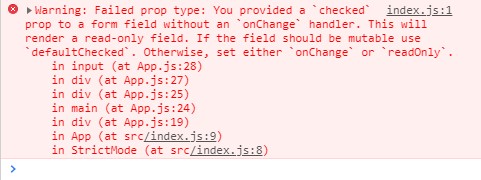
You should have this error in your console now. Also, the checkboxes would not be clickable. Don't worry we'll fix it soon.
Next, we would include a function handleClick to handle what happens when the checkbox is clicked and then we would set up the checkboxes to call the function handleClick whenever it is clicked. We also need to include a name for each of the checkboxes. I'm naming each with their colours for consistency.
class App extends React.Component {
    ...

    handleClick = () => {
        console.log("you clicked me!!");
    };

    render() {
        return (
            <div className="App">
                <header className="header">
                    <h1>Handling Multiple Checkboxes</h1>
                </header>

                <main>
                    <div>
                        <label>Choose your favourite colors</label>
                        <div>
                            <input checked={this.state.colors.red} onChange={this.handleClick} type="checkbox" name="red" /> Red
                        </div>
                        <div>
                            <input checked={this.state.colors.blue} onChange={this.handleClick} type="checkbox" name="blue" /> Blue
                        </div>
                        <div>
                            <input checked={this.state.colors.green} onChange={this.handleClick} type="checkbox" name="green" /> Green
                        </div>
                        <div>
                            <input checked={this.state.colors.yellow} onChange={this.handleClick} type="checkbox" name="yellow" /> Yellow
                        </div>
                        <div>
                            <input checked={this.state.colors.cyan} onChange={this.handleClick} type="checkbox" name="cyan" /> Cyan
                        </div>
                    </div>
                </main>
            </div>
        );
    }
}
The error in the console should be gone by now.
Here comes the tricky part.
handleClick = (event) => {
        const { name, checked } = event.target;

        this.setState((prevState) => {
            const colors = prevState.colors;
            colors[name] = checked;
            return colors;
        });
    };
In our handleClick function, we pass the event parameter and access the input element using event.target and we picked the name and checked value of the input box. Using the previous state we set the state of the clicked checkbox to the value of checked.
To display the selected values, We add the following code in our render function, before our return statement
const favColors = Object.keys(this.state.colors)
            .filter((key) => this.state.colors[key])
            .join(", ");
And in our return statement add a paragraph listing the chosen colours
<p> Your favourite colors are: {favColors}</p>
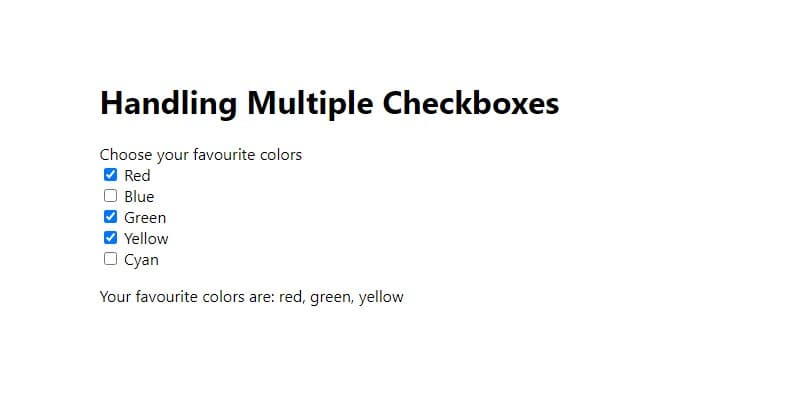
And there we have it! A working multi checkbox!